• Wyszukiwanie zaawansowane
  • Kategorie
  • Kategorie BISAC
  • Książki na zamówienie
  • Promocje
  • Granty
  • Książka na prezent
  • Opinie
  • Pomoc
  • Załóż konto
  • Zaloguj się

microsoft powerpoint 2010 bible » książka


zaloguj się | załóż konto
Logo Krainaksiazek.pl

koszyk

konto

szukaj
topmenu
Księgarnia internetowa
Szukaj
Książki na zamówienie
Promocje
Granty
Książka na prezent
Moje konto
Pomoc
 
 
Wyszukiwanie zaawansowane
Pusty koszyk
Bezpłatna dostawa dla zamówień powyżej 20 złBezpłatna dostawa dla zamówień powyżej 20 zł

Kategorie główne

• Nauka
 [2946600]
• Literatura piękna
 [1856966]

  więcej...
• Turystyka
 [72221]
• Informatyka
 [151456]
• Komiksy
 [35826]
• Encyklopedie
 [23190]
• Dziecięca
 [619653]
• Hobby
 [140543]
• AudioBooki
 [1577]
• Literatura faktu
 [228355]
• Muzyka CD
 [410]
• Słowniki
 [2874]
• Inne
 [445822]
• Kalendarze
 [1744]
• Podręczniki
 [167141]
• Poradniki
 [482898]
• Religia
 [510455]
• Czasopisma
 [526]
• Sport
 [61590]
• Sztuka
 [243598]
• CD, DVD, Video
 [3423]
• Technologie
 [219201]
• Zdrowie
 [101638]
• Książkowe Klimaty
 [124]
• Zabawki
 [2473]
• Puzzle, gry
 [3898]
• Literatura w języku ukraińskim
 [254]
• Art. papiernicze i szkolne
 [8170]
Kategorie szczegółowe BISAC

microsoft powerpoint 2010 bible

ISBN-13: 9780470591864 / Angielski / Twarda / 2010 / 816 str.
Faithe Wempen
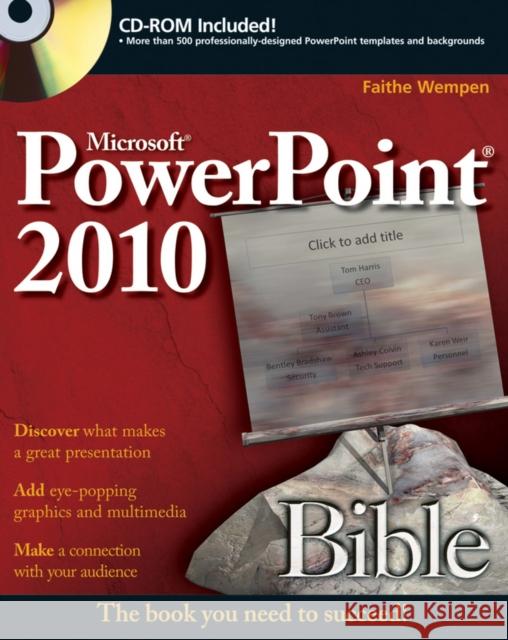
microsoft powerpoint 2010 bible  Wempen, Faithe 9780470591864  - książkaWidoczna okładka, to zdjęcie poglądowe, a rzeczywista szata graficzna może różnić się od prezentowanej.

microsoft powerpoint 2010 bible

ISBN-13: 9780470591864 / Angielski / Twarda / 2010 / 816 str.

Faithe Wempen
cena 150,85 zł
(netto: 143,67 VAT:  5%)

Najniższa cena z 30 dni: 149,61 zł
Termin realizacji zamówienia:
ok. 30 dni roboczych
Bez gwarancji dostawy przed świętami

Darmowa dostawa!

Master PowerPoint and improve your presentation skills-with one book It's no longer enough to have slide after slide of text, bullets, and charts. It's not even enough to have good speaking skills if your PowerPoint slides bore your audience. Get the very most out of all that PowerPoint 2010 has to offer while also learning priceless tips and techniques for making good presentations in this new PowerPoint 2010 Bible. Well-known PowerPoint expert and author Faithe Wempen provides formatting tips; shows you how to work with drawings, tables, and SmartArt; introduces new collaboration tools; walks you through five special presentation labs; and more. Coverage includes:

  • A First Look at PowerPoint
  • What Makes a Great Presentation?
  • Creating and Saving Presentation Files
  • Creating Slides and Text Boxes
  • Working with Layouts, Themes, and Masters
  • Formatting Paragraphs and Text Boxes
  • Correcting and Improving Text
  • Creating and Formatting Tables
  • Drawing and Formatting Objects
  • Creating SmartArt Diagrams
  • Using and Organizing Clip Art
  • Working with Photographic Images
  • Working with Charts
  • Incorporating Content from Other Programs
  • Adding Sound Effects, Music, and Soundtracks
  • Incorporating Motion Video
  • Creating Animation Effects and Transitions
  • Creating Support Materials
  • Preparing for a Live Presentation
  • Designing User-Interactive or Self-Running Presentations
  • Preparing a Presentation for Mass Distribution
  • Sharing and Collaborating
  • Customizing PowerPoint
  • Presenting Content Without Bulleted Lists
  • Adding Sound and Movement to a Presentation
  • Creating a Menu-Based Navigation System
  • Creating a Classroom Game
It's the book you need to succeed with PowerPoint 2010 and your next live presentation

Kategorie:
Informatyka
Kategorie BISAC:
Computers > Business & Productivity Software - Presentations
Język:
Angielski
ISBN-13:
9780470591864
Rok wydania:
2010
Numer serii:
000002433
Ilość stron:
816
Waga:
1.22 kg
Wymiary:
23.47 x 19.1 x 4.65
Oprawa:
Twarda
Wolumenów:
01
Dodatkowe informacje:
Wydanie ilustrowane

Preface xxix

Part I: Building Your Presentation 1

Chapter 1: A First Look at PowerPoint 3

Chapter 2:What Makes a Great Presentation? 37

Chapter 3: Creating and Saving Presentation Files 57

Chapter 4: Creating Slides and Text Boxes 89

Chapter 5: Working with Layouts, Themes, and Masters 115

Chapter 6: Formatting Text 151

Chapter 7: Formatting Paragraphs and Text Boxes 187

Chapter 8: Correcting and Improving Text 213

Chapter 9: Creating and Formatting Tables 235

Part II: Using Graphics and Multimedia Content 261

Chapter 10: Drawing and Formatting Objects 263

Chapter 11: Creating SmartArt Diagrams 311

Chapter 12: Using and Organizing Clip Art 331

Chapter 13: Working with Photographic Images 353

Chapter 14: Working with Charts 387

Chapter 15: Incorporating Content from Other Programs 421

Chapter 16: Adding Sound Effects, Music, and Soundtracks 437

Chapter 17: Incorporating Motion Video 463

Chapter 18: Creating Animation Effects and Transitions 491

Part III: Interfacing with Your Audience 521

Chapter 19: Creating Support Materials 523

Chapter 20: Preparing for a Live Presentation 545

Chapter 21: Designing User–Interactive or Self–Running Presentations 577

Chapter 22: Preparing a Presentation for Mass Distribution 607

Chapter 23: Sharing and Collaborating 629

Chapter 24: Customizing PowerPoint 649

Part IV: Project Labs 673

Lab 1: Presenting Content without Bulleted Lists 675

Lab 2: Adding Sound and Movement to a Presentation 691

Lab 3: Creating a Menu–Based Navigation System 709

Lab 4: Creating a Classroom Game 729

Appendix: What s on the CD–ROM? 749

Index 753

Faithe Wempen, M.A., is an A+ Certified hardware guru, Microsoft Office Specialist Master Instructor, and software consultant with over 70 computer books to her credit. When she is not writing, she teaches Microsoft Office classes in the Computer Technology department at Indiana University-Purdue University at Indianapolis (IUPUI), does private computer training and support consulting, and is the business manager of Sycamore Knoll Bed and Breakfast in Noblesville, Indiana. She teaches online classes for the Hewlett-Packard Learning Center, and serves on the advisory board for the Computer Technician program at Training, Inc. in Indianapolis.

Make a splash with these presentation tips and techniques

Anyone can create a presentation, but it takes more than bullet lists to make an impact. In this power–packed book, you′ll learn how to create professional–quality slides that will captivate an audience with photographs, charts, and sophisticated transition and animation effects. You′ll also learn how to deliver a first–rate presentation experience to your audience, whether you are speaking live at a podium, delivering content online, or distributing self–running DVDs. In this book, you′ll learn how to:

  • Customize slide layouts, themes, and masters

  • Integrate charts, photos, clip art, and more

  • Engage an audience with music and narration

  • Create handouts and speaker notes

  • Build custom slide shows with optional hidden content

  • Save slide shows in digital video format

  • Broadcast or publish presentations on the Web

Use eye–catching animation effects

Easily apply color correction to photos

Create information–rich graphic objects with SmartArt

What′s on the CD–ROM?

Find more than 500 professionally–designed PowerPoint templates and backgrounds that you can use in your own presentations.

See the CD Appendix in the book for details and complete system requirements.

Also in the Book

Four special project labs highlight complete presentations that show a variety of ways to create content. These labs include:

  • Presenting Content without Bulleted Lists

  • Adding Sound and Movement to a Presentation

  • Creating a Menu–Based Navigation System

  • Creating a Classroom Game

Discover what makes a great presentation

Add eye–popping graphics and multimedia

Make a connection with your audience


Udostępnij

Facebook - konto krainaksiazek.pl


Opinie o Krainaksiazek.pl na Opineo.pl

Partner Mybenefit

Krainaksiazek.pl w programie rzetelna firma Krainaksiaze.pl - płatności przez paypal

Czytaj nas na:

Facebook - krainaksiazek.pl
  • książki na zamówienie
  • granty
  • książka na prezent
  • kontakt
  • pomoc
  • opinie
  • regulamin
  • polityka prywatności

Zobacz:

  • Księgarnia czeska

  • Wydawnictwo Książkowe Klimaty

1997-2025 DolnySlask.com Agencja Internetowa

© 1997-2022 krainaksiazek.pl
     
KONTAKT | REGULAMIN | POLITYKA PRYWATNOŚCI | USTAWIENIA PRYWATNOŚCI
Zobacz: Księgarnia Czeska | Wydawnictwo Książkowe Klimaty | Mapa strony | Lista autorów
KrainaKsiazek.PL - Księgarnia Internetowa

Polityka prywatnosci - link
Krainaksiazek.pl - płatnośc Przelewy24
Przechowalnia Przechowalnia






