• Wyszukiwanie zaawansowane
  • Kategorie
  • Kategorie BISAC
  • Książki na zamówienie
  • Promocje
  • Granty
  • Książka na prezent
  • Opinie
  • Pomoc
  • Załóż konto
  • Zaloguj się

Windows 7 for Seniors for Dummies » książka


zaloguj się | załóż konto
Logo Krainaksiazek.pl

koszyk

konto

szukaj
topmenu
Księgarnia internetowa
Szukaj
Książki na zamówienie
Promocje
Granty
Książka na prezent
Moje konto
Pomoc
 
 
Wyszukiwanie zaawansowane
Pusty koszyk
Bezpłatna dostawa dla zamówień powyżej 20 złBezpłatna dostawa dla zamówień powyżej 20 zł

Kategorie główne

• Nauka
 [2946600]
• Literatura piękna
 [1856966]

  więcej...
• Turystyka
 [72221]
• Informatyka
 [151456]
• Komiksy
 [35826]
• Encyklopedie
 [23190]
• Dziecięca
 [619653]
• Hobby
 [140543]
• AudioBooki
 [1577]
• Literatura faktu
 [228355]
• Muzyka CD
 [410]
• Słowniki
 [2874]
• Inne
 [445822]
• Kalendarze
 [1744]
• Podręczniki
 [167141]
• Poradniki
 [482898]
• Religia
 [510455]
• Czasopisma
 [526]
• Sport
 [61590]
• Sztuka
 [243598]
• CD, DVD, Video
 [3423]
• Technologie
 [219201]
• Zdrowie
 [101638]
• Książkowe Klimaty
 [124]
• Zabawki
 [2473]
• Puzzle, gry
 [3898]
• Literatura w języku ukraińskim
 [254]
• Art. papiernicze i szkolne
 [8170]
Kategorie szczegółowe BISAC

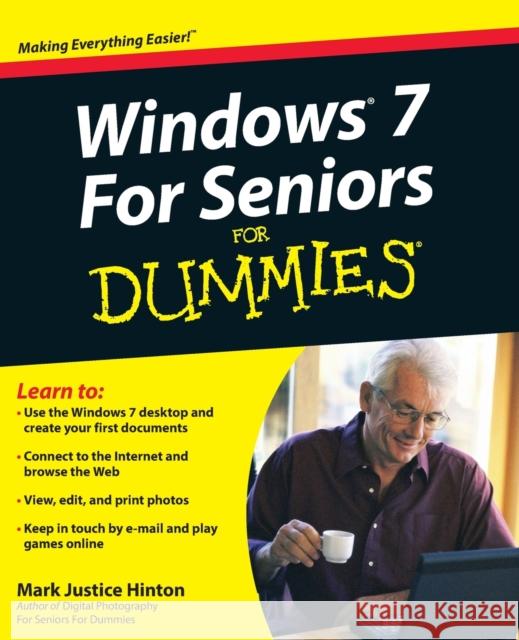
Windows 7 for Seniors for Dummies

ISBN-13: 9780470509463 / Angielski / Miękka / 2009 / 408 str.
MarkJustice Hinton
Windows 7 for Seniors for Dummies Hinton, Mark Justice 9780470509463  - książkaWidoczna okładka, to zdjęcie poglądowe, a rzeczywista szata graficzna może różnić się od prezentowanej.

Windows 7 for Seniors for Dummies

ISBN-13: 9780470509463 / Angielski / Miękka / 2009 / 408 str.

MarkJustice Hinton
cena 92,18 zł
(netto: 87,79 VAT:  5%)

Najniższa cena z 30 dni: 91,42 zł
Termin realizacji zamówienia:
ok. 30 dni roboczych
Bez gwarancji dostawy przed świętami

Darmowa dostawa!

This easy-to-understand guide helps seniors get started with Windows 7 Many seniors use a home computer to stay connected to family and friends. This fun and friendly guide shows how to use Windows 7, the most popular operating system pre-loaded onto personal computers and laptops, to write e-mails, connect with family via Windows Live Messenger, download pictures with Photo Gallery, and listen to music using Windows Media Player. Windows 7 For Seniors For Dummies uses a large font for the text that makes the book easier to read and it features magnified screen shots to help make the subject matter less intimidating. For Dummies author Mark Justice Hinton walks you through the basics of Windows 7, shows you how to customize the desktop so that it accommodates your needs, and explains how to use the webcam and instant messenger to keep in contact with family and friends. Plus, you'll get critical insight for protecting your personal information.

  • Shows seniors how to stay connected to family and friends using the features of Windows 7
  • Explains how to use the Internet, send and receive e-mail, upload and download photos, view video, listen to music, play games, use webcam and instant messenger, and more
  • Discusses the important topic of keeping data and personal information safe and secure
  • Uses a larger font for text and includes more than 150 enlarged screen shots
For seniors interested in getting started using the exciting features of Windows 7, Windows 7 For Seniors For Dummies is the ideal beginner guide

Kategorie:
Informatyka
Kategorie BISAC:
Computers > Operating Systems - Windows Desktop
Język:
Angielski
ISBN-13:
9780470509463
Rok wydania:
2009
Numer serii:
000032133
Ilość stron:
408
Waga:
0.56 kg
Wymiary:
23.11 x 18.54 x 2.29
Oprawa:
Miękka
Wolumenów:
01

Introduction 1

Part I: Getting to Know Windows 7 7

1: Getting Comfortable with the Windows 7 Desktop 9

2: Examining the Anatomy of a Window 29

3: Creating Your First Documents 45

4: Organizing Your Documents 69

Part II: Getting Things Done in Windows 7 93

5: Taking Advantage of the Windows Accessories 95

6: Installing and Removing Programs 115

7: Working with Printers and Other Add–On Devices 127

Part III: Discovering the Internet 141

8: Connecting to the Internet 143

9: Finding What You Need on the Web 153

10: Sending and Receiving E–Mail 179

Part IV: Having Fun with Windows 7 201

11: Playing Games 203

12: Enjoying Photos in Windows 7 213

13: Listening to Music and Watching DVDs 235

Part V: Having It Your Way with Windows 7 259

14: Making Windows 7 More Fun to Use 261

15: Using the Taskbar and Start Menu Smartly 285

16: Making Windows 7 Easier to Use 303

Part VI: Staying Safe and Keeping Windows 7 Healthy 323

17: Updating Windows 7 325

18: Protecting Your Computer 341

19: Keeping Your Data Safe 359

Index 377

Mark Justice Hinton teaches all kinds of technology from digital photography to HTML. He maintains a blog at www.mjhinton.com/help where he answers questions from his readers, and he is also the author of Digital Photography For Seniors For Dummies.

Windows® 7 For Seniors for Dummies

Learn to:

  • Use the Windows 7 desktop and create your first documents

  • Connect to the Internet and browse the Web

  • View, edit, and print photos

  • Keep in touch by e–mail and play games online

Mark Justice Hinton

Author of Digital Photography For Seniors For Dummies

You can learn to use Windows, get online, and start doing things today!

You don′t need a grandchild to teach you Windows 7 with this friendly guide, you′ll be using the mouse, working with folders, hooking up a printer, and cruising the Internet in nothing flat. Learn to use all the gizmos that come with Windows 7, shop online, view a slideshow of your favorite photos, send e–mail to a friend, enjoy music, and more!

  • Tour the desktop learn to use menus, the Start menu button, files, and folders

  • Do it create notes and letters, connect a printer, download photos from your digital camera, and put music on a CD

  • Have some fun discover Solitaire and other built–in games, listen to music, and watch a movie

  • Use the accessories display Gadgets on your desktop, draw with Paint, and use the Calculator

  • To keep or not install additional programs you want and remove those you don′t need

  • Protect your Windows learn to use the Action Center, download and install virus protection software, and keep it up to date

  • Have it your way make your screen easier to see, open files with a single click, and even have your computer read to you

  • The wide, wide Web shop and explore online and learn to stay safe

Open the book and find:

  • What′s on the taskbar

  • Directions for creating and saving documents

  • Steps for installing a printer and other peripherals

  • How to connect to the Internet anywhere

  • Backgammon and other games you can play online

  • Guidance on protecting your computer from viruses

  • How to send e–mail attachments

  • Advice on backing up documents and photos


Udostępnij

Facebook - konto krainaksiazek.pl


Opinie o Krainaksiazek.pl na Opineo.pl

Partner Mybenefit

Krainaksiazek.pl w programie rzetelna firma Krainaksiaze.pl - płatności przez paypal

Czytaj nas na:

Facebook - krainaksiazek.pl
  • książki na zamówienie
  • granty
  • książka na prezent
  • kontakt
  • pomoc
  • opinie
  • regulamin
  • polityka prywatności

Zobacz:

  • Księgarnia czeska

  • Wydawnictwo Książkowe Klimaty

1997-2025 DolnySlask.com Agencja Internetowa

© 1997-2022 krainaksiazek.pl
     
KONTAKT | REGULAMIN | POLITYKA PRYWATNOŚCI | USTAWIENIA PRYWATNOŚCI
Zobacz: Księgarnia Czeska | Wydawnictwo Książkowe Klimaty | Mapa strony | Lista autorów
KrainaKsiazek.PL - Księgarnia Internetowa

Polityka prywatnosci - link
Krainaksiazek.pl - płatnośc Przelewy24
Przechowalnia Przechowalnia






