• Wyszukiwanie zaawansowane
  • Kategorie
  • Kategorie BISAC
  • Książki na zamówienie
  • Promocje
  • Granty
  • Książka na prezent
  • Opinie
  • Pomoc
  • Załóż konto
  • Zaloguj się

Switching to a Mac For Dummies » książka


zaloguj się | załóż konto
Logo Krainaksiazek.pl

koszyk

konto

szukaj
topmenu
Księgarnia internetowa
Szukaj
Książki na zamówienie
Promocje
Granty
Książka na prezent
Moje konto
Pomoc
 
 
Wyszukiwanie zaawansowane
Pusty koszyk
Bezpłatna dostawa dla zamówień powyżej 20 złBezpłatna dostawa dla zamówień powyżej 20 zł

Kategorie główne

• Nauka
 [2946600]
• Literatura piękna
 [1856966]

  więcej...
• Turystyka
 [72221]
• Informatyka
 [151456]
• Komiksy
 [35826]
• Encyklopedie
 [23190]
• Dziecięca
 [619653]
• Hobby
 [140543]
• AudioBooki
 [1577]
• Literatura faktu
 [228355]
• Muzyka CD
 [410]
• Słowniki
 [2874]
• Inne
 [445822]
• Kalendarze
 [1744]
• Podręczniki
 [167141]
• Poradniki
 [482898]
• Religia
 [510455]
• Czasopisma
 [526]
• Sport
 [61590]
• Sztuka
 [243598]
• CD, DVD, Video
 [3423]
• Technologie
 [219201]
• Zdrowie
 [101638]
• Książkowe Klimaty
 [124]
• Zabawki
 [2473]
• Puzzle, gry
 [3898]
• Literatura w języku ukraińskim
 [254]
• Art. papiernicze i szkolne
 [8170]
Kategorie szczegółowe BISAC

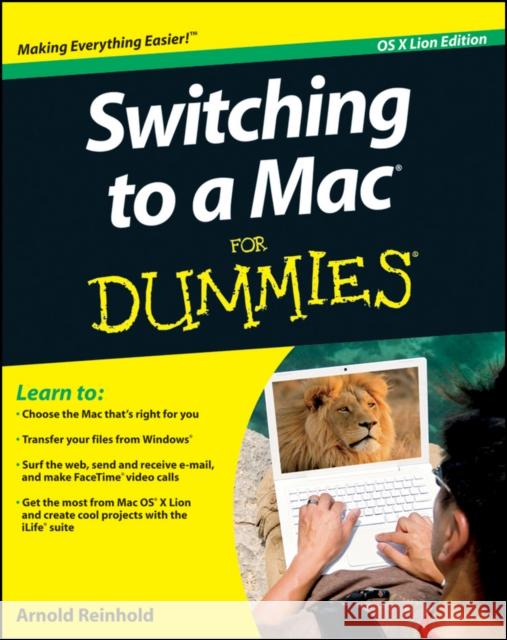
Switching to a Mac For Dummies

ISBN-13: 9781118024461 / Angielski / Miękka / 2011 / 432 str.
Arnold Reinhold
Switching to a Mac For Dummies Arnold Reinhold 9781118024461 John Wiley & Sons Inc - książkaWidoczna okładka, to zdjęcie poglądowe, a rzeczywista szata graficzna może różnić się od prezentowanej.

Switching to a Mac For Dummies

ISBN-13: 9781118024461 / Angielski / Miękka / 2011 / 432 str.

Arnold Reinhold
cena 100,84 zł
(netto: 96,04 VAT:  5%)

Najniższa cena z 30 dni: 100,84 zł
Termin realizacji zamówienia:
ok. 8-10 dni roboczych
Bez gwarancji dostawy przed świętami

Darmowa dostawa!

Learn how to make the switch from PC to Mac a completely smooth transition The number of Mac users continues to increase significantly each year. If you are one of those people and are eager but also anxious about making the switch, then fear not This friendly guide skips the jargon to deliver you an easy-to-read, understandable introduction to the Macintosh computer. Computer guru Arnold Reinhold walks you through the Mac OS, user interface, and icons. You'll learn how to set up your Mac, move your files from your PC to your Mac, switch applications, get your Mac online, network your Mac, secure your Mac, work with the iLife suite, troubleshoot common problems, and more.

  • Dives in to helping you make the switch from PC to Mac as smooth and effortless as possible
  • Walks you through the latest features of Mac OS X Lion to help you take advantage of all the cool things your Mac can do that you might not know about
  • Offers clear instructions for working with the iLife applications, running Windows on your Mac via Boot Camp, networking your Mac, and switching your family or your business to a Mac
  • Shares essential advice for troubleshooting common problems and provides easy tips for keeping your Mac happy
Switching to Mac For Dummies, Mac OS X Lion Edition is all you need to switch to a Mac and never look back

Kategorie:
Informatyka, Sprzęt komputerowy
Kategorie BISAC:
Computers > Hardware - Personal Computers - Macintosh
Wydawca:
John Wiley & Sons Inc
Język:
Angielski
ISBN-13:
9781118024461
Rok wydania:
2011
Wydanie:
OS X Lion
Numer serii:
000032133
Ilość stron:
432
Waga:
0.62 kg
Wymiary:
23.42 x 18.67 x 2.44
Oprawa:
Miękka
Wolumenów:
01
Dodatkowe informacje:
Glosariusz/słownik

Introduction 1

Part I: Informed Switching Starts Here 7

Chapter 1: Why Switch? Demystifying the Mac Mantra 9

Chapter 2: Meet the Mac Family 23

Chapter 3: Deciding What to Buy 49

Part II: Making the Switch 83

Chapter 4: The Big Day: Setting Up Your Mac 85

Chapter 5: Mac OS X for Windows Users 99

Chapter 6: Moving Files from Your PC to the Mac 131

Chapter 7: Switching Applications 149

Part III: Connecting Hither and Yon 169

Chapter 8: Getting Your Mac Online 171

Chapter 9: Networking the Mac Way 195

Chapter 10: Staying Secure in a Connected World 215

Chapter 11: Connecting with iDevices, iTunes, and iCloud 235

Part IV: More Software, More Choices 247

Chapter 12: Picturing iPhoto 249

Chapter 13: Producing Movies and Music on Your Mac 261

Chapter 14: Building Your Space on the Web 273

Chapter 15: Enjoying Other OS X Goodies 283

Chapter 16: Oops, It s a PC: Running Windows on Your Mac 297

Part V: Specialty Switching Scenarios 307

Chapter 17: Switching with the Whole Family in Mind 309

Chapter 18: Switching Your Business to Macs 329

Chapter 19: Desktop to Dashcode: OS X Advanced 335

Part VI: The Part of Tens 347

Chapter 20: Ten Terrifi c Troubleshooting Tips 349

Chapter 21: Ten Ways Your Mac Can Help the Planet 361

Chapter 22: Ten Creative Uses for Your Old PC 369

Appendix: Mac Speak versus Windows Speak: A Translation Glossary 373

Index 401

Bonus Chapter 1: Converting from OS 9 and Other Operating Systems BC1

Arnold Reinhold has more than three decades of experience in the software industry. His first Apple product was a Mac 512. He has authored or coauthored numerous books, including Mac mini Hacks & Mods For Dummies, Green IT For Dummies, and Internet Quick Reference For Dummies.

Using a Mac is easy. This guide makes switching easy too!

Congratulations! You′ve decided to leave hassles behind and join the user–friendly, more secure community of Mac users. Consider this guide your welcome basket. It′ll tell you what to expect, how to choose a Mac (if you haven′t already), and howto make the switch a breeze. Discover cool new OS X Lion features, the Mac′s handy built–in apps, and how to work the Mac way.

  • Meet the family compare the MacBook Air®, MacBook Pro, iMac®, Mac Pro, and Mac mini

  • I′m a Mac, and you′re leaving a PC see what′s alike and what′s different, and learn to use Apple menus and the Finder

  • Can I keep it? find out which peripherals will still work with your Mac

  • Moving day transfer your files, address book, and content stored on other media

  • Ready, set, connect set up your Internet service and e–mail application, and connect to your printer and other peripherals

  • Get an apptitude add apps from the Mac App Store; manage your music, photos, movies, and more with iTunes®, iPhoto®, and iMovie®

  • Safety first learn what makes Macs safer and why strong passwords are still important

  • If you just can′t say goodbye see how to run Windows® on your Mac

Open the book and find:

  • How a Mac can simplify your life

  • Tips on keeping your Mac updated and secure

  • Ways to unleash your creativity with photos, audio, and video

  • Advice on navigating with Launchpad and Mission Control

  • Help with switching specialized software to your Mac

  • Special tips for seniors and parents of young kids

  • Instructions for Mac network and Wi–Fi setup

  • How to enjoy Facebook® and other social networking sites

Learn to:

  • Choose the Mac that′s right for you

  • Transfer your files from Windows®

  • Surf the web, send and receive e–mail, and make FaceTime video calls

  • Get the most from Mac OS X Lion and create cool projects with the iLife suite


Udostępnij

Facebook - konto krainaksiazek.pl


Opinie o Krainaksiazek.pl na Opineo.pl

Partner Mybenefit

Krainaksiazek.pl w programie rzetelna firma Krainaksiaze.pl - płatności przez paypal

Czytaj nas na:

Facebook - krainaksiazek.pl
  • książki na zamówienie
  • granty
  • książka na prezent
  • kontakt
  • pomoc
  • opinie
  • regulamin
  • polityka prywatności

Zobacz:

  • Księgarnia czeska

  • Wydawnictwo Książkowe Klimaty

1997-2025 DolnySlask.com Agencja Internetowa

© 1997-2022 krainaksiazek.pl
     
KONTAKT | REGULAMIN | POLITYKA PRYWATNOŚCI | USTAWIENIA PRYWATNOŚCI
Zobacz: Księgarnia Czeska | Wydawnictwo Książkowe Klimaty | Mapa strony | Lista autorów
KrainaKsiazek.PL - Księgarnia Internetowa

Polityka prywatnosci - link
Krainaksiazek.pl - płatnośc Przelewy24
Przechowalnia Przechowalnia