• Wyszukiwanie zaawansowane
  • Kategorie
  • Kategorie BISAC
  • Książki na zamówienie
  • Promocje
  • Granty
  • Książka na prezent
  • Opinie
  • Pomoc
  • Załóż konto
  • Zaloguj się

Photoshop Elements 14 for Dummies » książka


zaloguj się | załóż konto
Logo Krainaksiazek.pl

koszyk

konto

szukaj
topmenu
Księgarnia internetowa
Szukaj
Książki na zamówienie
Promocje
Granty
Książka na prezent
Moje konto
Pomoc
 
 
Wyszukiwanie zaawansowane
Pusty koszyk
Bezpłatna dostawa dla zamówień powyżej 20 złBezpłatna dostawa dla zamówień powyżej 20 zł

Kategorie główne

• Nauka
 [2946350]
• Literatura piękna
 [1816154]

  więcej...
• Turystyka
 [70666]
• Informatyka
 [151172]
• Komiksy
 [35576]
• Encyklopedie
 [23172]
• Dziecięca
 [611458]
• Hobby
 [135995]
• AudioBooki
 [1726]
• Literatura faktu
 [225763]
• Muzyka CD
 [378]
• Słowniki
 [2917]
• Inne
 [444280]
• Kalendarze
 [1179]
• Podręczniki
 [166508]
• Poradniki
 [469467]
• Religia
 [507199]
• Czasopisma
 [496]
• Sport
 [61352]
• Sztuka
 [242330]
• CD, DVD, Video
 [3348]
• Technologie
 [219391]
• Zdrowie
 [98638]
• Książkowe Klimaty
 [124]
• Zabawki
 [2382]
• Puzzle, gry
 [3525]
• Literatura w języku ukraińskim
 [259]
• Art. papiernicze i szkolne
 [7107]
Kategorie szczegółowe BISAC

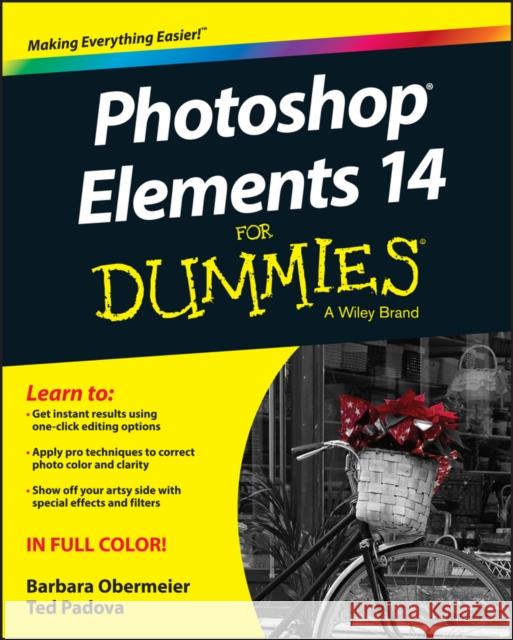
Photoshop Elements 14 for Dummies

ISBN-13: 9781119131946 / Angielski / Miękka / 2015 / 448 str.
Barbara Obermeier
Photoshop Elements 14 for Dummies Obermeier, Barbara 9781119131946 Wiley - książkaWidoczna okładka, to zdjęcie poglądowe, a rzeczywista szata graficzna może różnić się od prezentowanej.

Photoshop Elements 14 for Dummies

ISBN-13: 9781119131946 / Angielski / Miękka / 2015 / 448 str.

Barbara Obermeier
cena 113,37
(netto: 107,97 VAT:  5%)

Najniższa cena z 30 dni: 111,98
Termin realizacji zamówienia:
ok. 30 dni roboczych.

Darmowa dostawa!

The bestselling book on Photoshop Elements--now in a new edition Getting great photos is easier than you think--it just takes some know-how and a tool like Adobe's Photoshop Elements. Photoshop Elements 14 For Dummies is a fun and easy-to-follow guide for photographers and photo enthusiasts who want to make their snapshots picture perfect. In no time, you'll tackle the basics of Photoshop Elements and find out how to execute hundreds of tasks, like using special effects and drawing tools, working with layers, improving your color and clarity, and so much more. Photoshop Elements is the #1 selling consumer photo editing software, and Adobe continues to add innovative features that allow professional and self-made digital photographers to do it all. Written by veteran authors Barb Obermeier and Ted Padova, this full-color guide shows you how to make the most of the latest version of the software in a fun and friendly way that makes learning feel like play. Even if you have no digital image editing experience at all, this hands-on guide shows you how to take your photos from 'meh' to 'wow'--and have a blast along the way

  • Get instant results using one-click editing options
  • Apply pro techniques to correct photo color and clarity
  • Show off your artsy side with special effects and filters
  • Find tips for improving edits and creative projects
The power and simplicity of Photoshop Elements makes it easy to turn out photos worth bragging about--and this no-nonsense guide will get you there in a flash.

Kategorie:
Informatyka
Kategorie BISAC:
Computers > Image Processing
Computers > Software Development & Engineering - Computer Graphics
Wydawca:
Wiley
Język:
Angielski
ISBN-13:
9781119131946
Rok wydania:
2015
Ilość stron:
448
Waga:
0.74 kg
Wymiary:
23.11 x 18.54 x 2.54
Oprawa:
Miękka
Wolumenów:
01

Introduction 1

Part I: Getting Started with Photoshop Elements 14 5

Chapter 1: Getting Started with Image Editing 7

Chapter 2: Basic Image Editing Concepts 23

Chapter 3: Exploring the Photo Editor 49

Part II: Managing Media 73

Chapter 4: Navigating the Organizer 75

Chapter 5: Organizing Your Pictures 91

Chapter 6: Viewing and Finding Your Images 115

Part III: Selecting and Correcting Photos 131

Chapter 7: Making and Modifying Selections 133

Chapter 8: Working with Layers 163

Chapter 9: Simple Image Makeovers 185

Chapter 10: Correcting Contrast, Color, and Clarity 219

Part IV: Exploring Your Inner Artist 251

Chapter 11: Playing with Filters, Effects, Styles, and More 253

Chapter 12: Drawing and Painting 289

Chapter 13: Working with Type 315

Part V: Printing, Creating, and Sharing 335

Chapter 14: Getting It on Paper 337

Chapter 15: Sharing Your Work 353

Chapter 16: Making Creations 365

Part VI: The Part of Tens 373

Chapter 17: Ten Tips for Composing Better Photos 375

Chapter 18: Ten (Or So) More Project Ideas 381

Index 387

Barb Obermeier is principal of Obermeier Design, a graphic design studio specializing in print and web design, and lead instructor in the graphic design program at Brooks Institute. Ted Padova is an internationally recognized authority on Adobe Acrobat, PDF, and digital imaging. He has written more than 60 books.

Learn to:

  • Get instant results using one–click editing options
  • Apply pro techniques to correct photo color and clarity
  • Show off your artsy side with special effects and filters

Put pizzazz in your pix with the professional tools in Photoshop® Elements

There′s a reason why Photoshop Elements For Dummies is the best place to start learning Elements it gets you going with this amazing image–editing software faster than you can say "cheese"! From learning your way around the interface and handling simple tasks to working with layers, correcting color and clarity, and creating cool projects, here′s how it′s done!

  • Master all the new features take advantage of improved facial recognition, better geotagging, Shake Reduction, and image dehazing
  • Manage your media use bulk importing, organize photos with tags, place them on a map, and catalog images for editing
  • Improve your images use Smart Fix edits, adjust size and resolution, clean up color, and sharpen contrast
  • It′s worth sharing prepare images for printing, create slideshows, or upload them to social media sites

Open the book and find:

  • What′s new in Elements 14
  • Why file formats matter
  • How to add images from your phone
  • Advice on working with albums
  • Easy ways to find specific photos
  • How to use all the tools
  • Directions for backing up your images
  • Ten tips for getting better shots


Udostępnij

Facebook - konto krainaksiazek.pl


Opinie o Krainaksiazek.pl na Opineo.pl

Partner Mybenefit

Krainaksiazek.pl w programie rzetelna firma Krainaksiaze.pl - płatności przez paypal

Czytaj nas na:

Facebook - krainaksiazek.pl
  • książki na zamówienie
  • granty
  • książka na prezent
  • kontakt
  • pomoc
  • opinie
  • regulamin
  • polityka prywatności

Zobacz:

  • Księgarnia czeska

  • Wydawnictwo Książkowe Klimaty

1997-2026 DolnySlask.com Agencja Internetowa

© 1997-2022 krainaksiazek.pl
     
KONTAKT | REGULAMIN | POLITYKA PRYWATNOŚCI | USTAWIENIA PRYWATNOŚCI
Zobacz: Księgarnia Czeska | Wydawnictwo Książkowe Klimaty | Mapa strony | Lista autorów
KrainaKsiazek.PL - Księgarnia Internetowa

Polityka prywatnosci - link
Krainaksiazek.pl - płatnośc Przelewy24
Przechowalnia Przechowalnia






