• Wyszukiwanie zaawansowane
  • Kategorie
  • Kategorie BISAC
  • Książki na zamówienie
  • Promocje
  • Granty
  • Książka na prezent
  • Opinie
  • Pomoc
  • Załóż konto
  • Zaloguj się

Adobe CS4 DesPre AIO FD » książka


zaloguj się | załóż konto
Logo Krainaksiazek.pl

koszyk

konto

szukaj
topmenu
Księgarnia internetowa
Szukaj
Książki na zamówienie
Promocje
Granty
Książka na prezent
Moje konto
Pomoc
 
 
Wyszukiwanie zaawansowane
Pusty koszyk
Bezpłatna dostawa dla zamówień powyżej 20 złBezpłatna dostawa dla zamówień powyżej 20 zł

Kategorie główne

• Nauka
 [2950560]
• Literatura piękna
 [1849509]

  więcej...
• Turystyka
 [71097]
• Informatyka
 [151150]
• Komiksy
 [35848]
• Encyklopedie
 [23178]
• Dziecięca
 [617388]
• Hobby
 [139064]
• AudioBooki
 [1657]
• Literatura faktu
 [228597]
• Muzyka CD
 [383]
• Słowniki
 [2855]
• Inne
 [445295]
• Kalendarze
 [1464]
• Podręczniki
 [167547]
• Poradniki
 [480102]
• Religia
 [510749]
• Czasopisma
 [516]
• Sport
 [61293]
• Sztuka
 [243352]
• CD, DVD, Video
 [3414]
• Technologie
 [219456]
• Zdrowie
 [101002]
• Książkowe Klimaty
 [124]
• Zabawki
 [2311]
• Puzzle, gry
 [3459]
• Literatura w języku ukraińskim
 [254]
• Art. papiernicze i szkolne
 [8079]
Kategorie szczegółowe BISAC

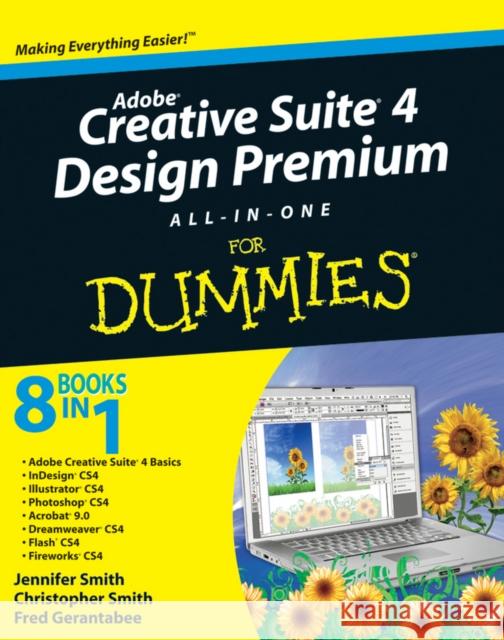
Adobe CS4 DesPre AIO FD

ISBN-13: 9780470331866 / Angielski / Miękka / 2008 / 936 str.
Jennifer Smith
Adobe CS4 DesPre AIO FD Smith, Jennifer 9780470331866  - książkaWidoczna okładka, to zdjęcie poglądowe, a rzeczywista szata graficzna może różnić się od prezentowanej.

Adobe CS4 DesPre AIO FD

ISBN-13: 9780470331866 / Angielski / Miękka / 2008 / 936 str.

Jennifer Smith
cena 117,32
(netto: 111,73 VAT:  5%)

Najniższa cena z 30 dni: 116,83
Termin realizacji zamówienia:
ok. 30 dni roboczych
Dostawa w 2026 r.

Darmowa dostawa!

Design professionals rely on Adobe's Creative Suite Design Premium to deliver innovative ideas in print, Web, and mobile design. Adobe CS4 Design Premium All-in-One For Dummies helps you beef up your skills with the latest version of this software. You'll learn all about the hot new versions of InDesign, Illustrator, Photoshop, Acrobat, Dreamweaver, Flash, and Fireworks. Whether you're creating newsletters, Web sites, cool original art, or animations, this book has it covered. You'll find out how to build Web pages with text and drawings, photos, Flash animations, and rollovers; check out enhanced Photoshop 3D tools; develop interactive animations for the Web or video with Flash CS4; and use the easier rollover and action features in Dreamweaver CS4 to add interactivity without coding. You'll also discover:

  • How to get familiar with the menus, panels, and tools that are similar throughout the suite
  • Tips for getting creative with Illustrator's cool new vector tracing feature
  • Ways to use the annotation capabilities in Acrobat 9.0 and the improved CSS capabilities in Dreamweaver
  • What Fireworks CS4, the newest addition to the suite, can add to Web sites
  • Which extensions and filters are common to all programs
  • Hard-to-find keyboard shortcuts in Illustrator
  • How to enhance and manipulate photos with Photoshop
  • Secrets for smoothing out your workflow
  • How to use the Adobe Bridge
  • Steps for using each program
To help you quickly find what you need, Adobe CS4 Design Premium All-in-One For Dummies is divided into eight minibooks:
  • Adobe Creative Suite Basics
  • InDesign CS4
  • Illustrator CS4
  • Photoshop CS4
  • Acrobat CS4
  • Dreamweaver CS4
  • Flash CS4
  • Fireworks CS4
Adobe CS4 Design Premium All-in-One For Dummies is your one-stop guide to all the parts of Adobe's ultimate toolkit for today's designer.

Kategorie:
Informatyka, Grafika komputerowa
Kategorie BISAC:
Computers > Software Development & Engineering - Computer Graphics
Computers > Image Processing
Język:
Angielski
ISBN-13:
9780470331866
Rok wydania:
2008
Numer serii:
000032133
Ilość stron:
936
Waga:
1.33 kg
Wymiary:
23.37 x 18.8 x 5.08
Oprawa:
Miękka
Wolumenów:
01
Dodatkowe informacje:
Wydanie ilustrowane

Introduction 1

Book I: Adobe Creative Suite 4 Basics 7

Chapter 1: Introducing Adobe Creative Suite 4 .9

Chapter 2: Using Common Menus and Commands 17

Chapter 3: Exploring Common Panels 27

Chapter 4: Using Common Extensions 33

Chapter 5: Importing and Exporting 39

Chapter 6: Handling Graphics, Paths, Text, and Fonts 53

Chapter 7: Using Color 63

Chapter 8: Printing Documents 71

Book II: InDesign CS4 79

Chapter 1: What’s New in InDesign CS4 81

Chapter 2: Introducing InDesign CS4 89

Chapter 3: Drawing in InDesign 107

Chapter 4: Working with Text and Text Frames 127

Chapter 5: Understanding Page Layout 153

Chapter 6: Clipping Paths, Transforming Objects, and Alignment 171

Chapter 7: Understanding Color and Printing 181

Chapter 8: Exporting Your Work 193

Chapter 9: Integrating InDesign 201

Book III: Illustrator CS4 213

Chapter 1: What’s New in Illustrator CS4215

Chapter 2: Discovering Illustrator CS4 221

Chapter 3: Using the Selection Tools 235

Chapter 4: Creating Basic Shapes 245

Chapter 5: Using the Pen Tool and Placing Images 253

Chapter 6: Using Type in Illustrator 267

Chapter 7: Organizing Your Illustrations 291

Chapter 8: Using Layers 301

Chapter 9: Livening Up Illustrations with Color 307

Chapter 10: Using the Transform and Distortions Tools 325

Chapter 11: Working with Transparency and Special Effects Tools 337

Chapter 12: Using Filters and Effects 349

Chapter 13: Using Your Illustrator Images 361

Book IV: Photoshop CS4 377

Chapter 1: Exploring New Features in Photoshop CS4 379

Chapter 2: Getting Into Photoshop CS4 Basics 385

Chapter 3: Messing with Mode Matters 395

Chapter 4: Creating a Selection 403

Chapter 5: Using the Photoshop Pen Tool 419

Chapter 6: Thinking about Resolution Basics 429

Chapter 7: Creating a Good Image 435

Chapter 8: Working with Painting and Retouching Tools 449

Chapter 9: Using Layers 465

Chapter 10: Saving Photoshop Images for Print and the Web 481

Book V: Acrobat 9.0 493

Chapter 1: Discovering Essential Acrobat Information 495

Chapter 2: Creating PDF Files 505

Chapter 3: Adding Interactivity to PDF Files 515

Chapter 4: Editing and Extracting Text and Graphics 523

Chapter 5: Using Commenting and Annotation Tools 531

Chapter 6: Securing Your PDF Files 543

Book VI: Dreamweaver CS4 549

Chapter 1: Getting Familiar with New Features in Dreamweaver 551

Chapter 2: Introducing Dreamweaver CS4 561

Chapter 3: Creating a Web Site 571

Chapter 4: Working with Images 581

Chapter 5: Putting Text on the Page 595

Chapter 6: Linking It Together 609

Chapter 7: Creating Tables 617

Chapter 8: Creating CSS Layouts 627

Chapter 9: Publishing Your Web Site 637

Book VII: Flash CS4 647

Chapter 1: Getting Started in Flash CS4 649

Chapter 2: Drawing in Flash CS4 663

Chapter 3: Symbols and Animation 679

Chapter 4: Applying More Advanced Animation 699

Chapter 5: Importing Graphics and Sounds 719

Chapter 6: Lights, Camera, Movie Clips! 739

Chapter 7: Controlling Your Movie with ActionScript 751

Chapter 8: Getting Into the (Work)flow 767

Chapter 9: Publishing and Final Delivery 781

Book VIII: Fireworks CS4 793

Chapter 1: Introducing Fireworks CS4 795

Chapter 2: Free to Create 803

Chapter 3: Livening Up Your Artwork with Color 813

Chapter 4: Creating Text in Fireworks 819

Chapter 5: Getting Images In and Out of Fireworks 827

Chapter 6: Hotspots, Slices, and CSS Layouts 837

Chapter 7: Using Buttons and Symbols 849

Chapter 8: Don’t Just Sit There — Animate! 857

Index 869

Jennifer Smith is a Certified Technical Instructor and former art director. She also founded Aquent Graphics Institute. Christopher Smith is President of Aquent Graphics Institute and an Adobe Certified Expert. Fred Gerantabee is an Emmy Award–winning interactive designer, author, and educator.

Here′s your one–stop guide to all the parts of Adobe CS4 Design Premium

Design professionals (like you!) rely on Adobe′s Creative Suite Design Premium and this all–in–one guide. Here′s everything you need on the hot new versions of InDesign, Illustrator, Photoshop, Acrobat, Dreamweaver, Flash, and Fireworks. Whether you′re creating newsletters, Web sites, cool original art, or animations, this book has it covered!

  • Get it together — see how the programs dovetail to create pages with text and drawings, or Web sites with photos, Flash animations, and rollovers
  • Know your toolbox — get familiar with the menus, panels, and tools that are similar throughout the suite

  • Find your vector — get creative with Illustrator′s cool new vector tracing feature

  • See what′s new — check out enhanced Photoshop 3D tools, annotation capabilities in Acrobat 9.0, improved CSS capabilities in Dreamweaver, and more

  • Animate in a Flash — create interactive animations for the Web or video with Flash CS4

  • Interact — use the easier rollover and action features in Dreamweaver CS4 to add interactivity without coding

  • Fire up your site — explore what Fireworks CS4, the newest addition to the suite, can add to Web sites

Open the book and find:

  • Which extensions and filters are common to all programs
  • Hard–to–find keyboard shortcuts in Illustrator

  • How to enhance and manipulate photos with Photoshop

  • Secrets for smoothing out your workflow

  • How to use the Adobe Bridge

  • The difference between RGB and CMYK

  • How to secure PDF files

  • Steps for using each program


Udostępnij

Facebook - konto krainaksiazek.pl


Opinie o Krainaksiazek.pl na Opineo.pl

Partner Mybenefit

Krainaksiazek.pl w programie rzetelna firma Krainaksiaze.pl - płatności przez paypal

Czytaj nas na:

Facebook - krainaksiazek.pl
  • książki na zamówienie
  • granty
  • książka na prezent
  • kontakt
  • pomoc
  • opinie
  • regulamin
  • polityka prywatności

Zobacz:

  • Księgarnia czeska

  • Wydawnictwo Książkowe Klimaty

1997-2025 DolnySlask.com Agencja Internetowa

© 1997-2022 krainaksiazek.pl
     
KONTAKT | REGULAMIN | POLITYKA PRYWATNOŚCI | USTAWIENIA PRYWATNOŚCI
Zobacz: Księgarnia Czeska | Wydawnictwo Książkowe Klimaty | Mapa strony | Lista autorów
KrainaKsiazek.PL - Księgarnia Internetowa

Polityka prywatnosci - link
Krainaksiazek.pl - płatnośc Przelewy24
Przechowalnia Przechowalnia






